 MoneyBook
Envelope budgeting and sinking funds
Give every amount a job with MoneyBook's envelopes, cover overspending from another envelope, and spread yearly bills over the months before they're due.
There are two classic ways to budget. The first sets a limit per category ("$400 a month on food") and warns you as you get close. The second, envelope budgeting, starts from the money you actually have and gives every amount a job before you spend it.
MoneyBook supports both, and you can switch between them at any time from the top of the Budget tab. This post focuses on envelopes, then shows how sinking funds keep big yearly bills from catching you off guard.
MoneyBook is a record-keeping tool, not financial advice. It helps you plan with your own numbers. Decisions about saving, borrowing or spending are yours, and a qualified adviser can help with the big ones.
Limits first, briefly
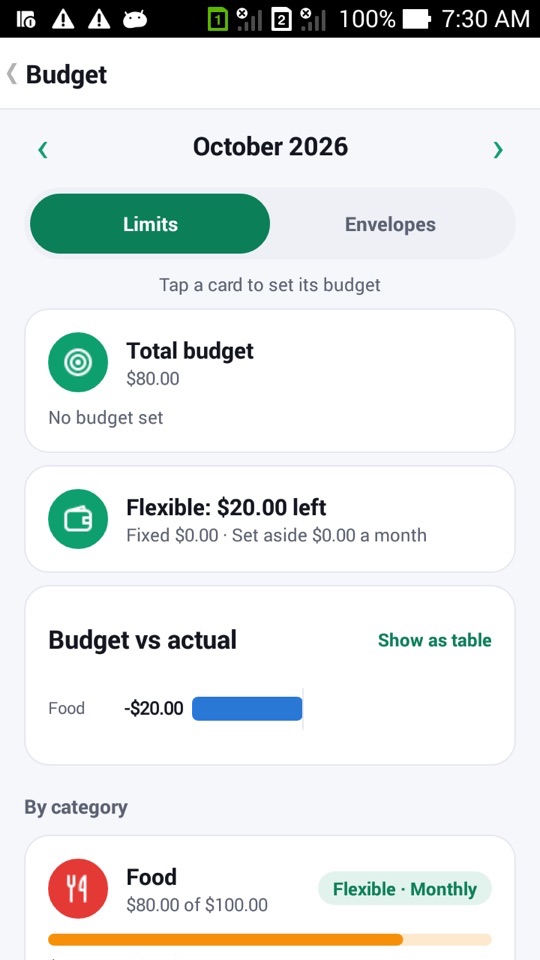
In Limits mode, tap a category card to set its budget. Each budget can be weekly (following your first day of the week), monthly or annual, and can carry over the unspent part of the last period. Bars fill as you spend. MoneyBook can alert you at 80% and 100%, and the card says "Over by $118.53" instead of relying on color alone. When a period ends within budget, a small Budget kept badge appears.
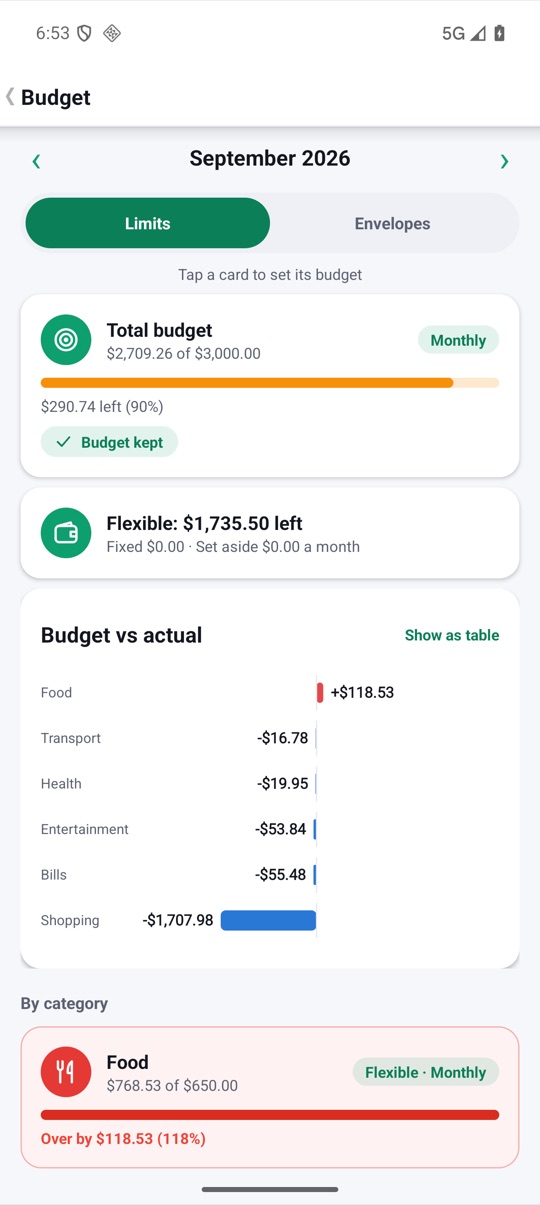
Envelopes: give every amount a job
Switch the toggle to Envelopes and the screen changes. At the top is Ready to assign: the income you've received that hasn't been put into an envelope yet. Below it, each category is an envelope showing what you assigned this month and what you spent.
Your job is to bring Ready to assign down to zero by spreading it across the envelopes. When everything is assigned, MoneyBook tells you "Every amount has a job." If you assign more than you have, it asks you to take some back from an envelope.
Envelope balances roll over. If you assign $300 to Food and spend $260, the $40 stays in the envelope next month. That way your budget follows what really happened, not just the calendar.
Loan and asset accounts stay off budget, so a mortgage balance or a car's value doesn't get mixed up with your day-to-day money.
When an envelope runs dry: Cover from…
Overspending happens. When an envelope goes negative, its card turns red and shows a Cover from… button. Tap it, choose an envelope that has money to spare, and move the amount across. A snackbar confirms ("Moved $50.00 from Ready to assign") with an Undo.
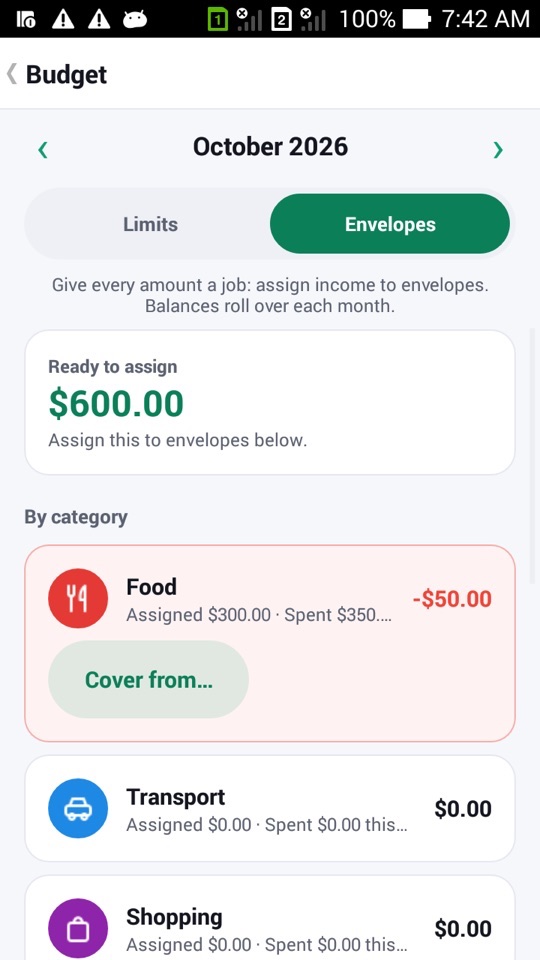
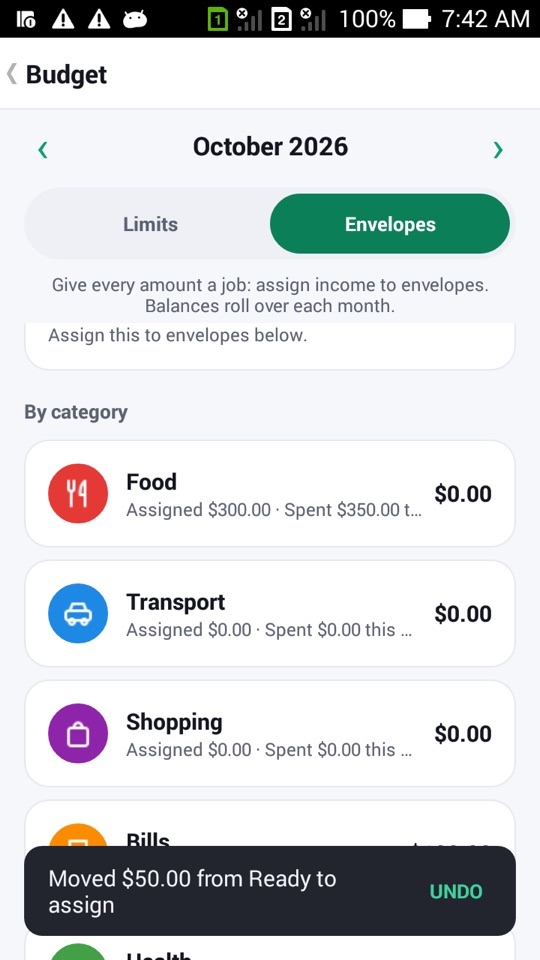
Covering moves money between envelopes. It doesn't add a fake transaction to your ledger, so your account balances and spending history stay accurate.
Targets for things you're saving towards
An envelope can have an optional target, such as $600 by December. MoneyBook then works out what to assign each month ("Assign $150 this month to reach $600 by Dec") or tells you you're on track. If a month is tight, Snooze this month pauses the reminder without deleting the target.
If you switch back to Limits, nothing is lost. MoneyBook keeps both your limits and your envelopes, so you can try one style and go back to the other.
Sinking funds for non-monthly bills
Some bills only come once or twice a year: insurance, a car service, a yearly subscription. They're easy to forget until the month they land. MoneyBook handles them through budget groups in Limits mode.
Tap a category card on the Budget tab and choose its Group:
- Fixed for bills that don't change, like rent.
- Flexible for everyday spending. A "Flexible: $X left" card at the top shows what's left after fixed costs.
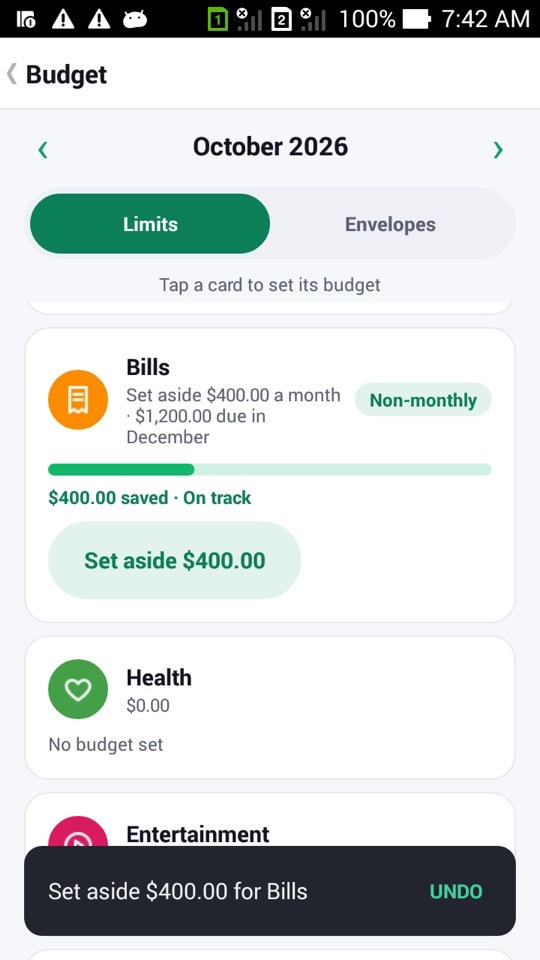
- Non-monthly for bills with a due month. MoneyBook spreads the amount over the months before it's due.
A non-monthly card shows the monthly set-aside, the due month, and whether you're On track or Behind. A Set aside button records this month's share. These due dates also feed the balance forecast, so a big December bill shows up in your outlook well before December.
How to start with envelopes
- Open the Budget tab and switch the toggle from Limits to Envelopes.
- Check Ready to assign. It's the income you've logged that isn't in an envelope yet.
- Tap an envelope, enter an amount under Assign this month and save. Repeat until Ready to assign reaches zero.
- Optionally add a Target to envelopes you're saving into.
- When an envelope goes negative, tap Cover from… and pick an envelope with money to spare.
- For yearly bills, switch to Limits, tap the category, set its group to Non-monthly, choose the due month, and tap Set aside each month.
FAQ
Can I use envelopes and limits at the same time?
You use one style at a time per book, but switching keeps both. Your limits are still there when you come back from envelopes, and the other way round.
Does covering an envelope create a transaction?
No. It's an envelope move, not a ledger entry, so your account balances and spending history don't change. You can undo it from the snackbar.
What happens to unspent money at the end of the month?
In Envelopes mode, it rolls over and stays in the envelope. In Limits mode, carry-over is optional per budget.
Do different books have separate budgets?
Yes. Each book (for example Personal and Family) has its own accounts, categories, budgets and budget style.